Transfers

  • Updated

Transfers are the movement of assets and fee balances between main and subaccounts or between two subaccounts.

Transfers can be initiated by clicking Transfer next to the relevant asset on the wallet page. The wallet page can be reached by clicking on the wallet icon in the top right of the user interface.

Note

Transfers can also be performed using the API (see details below).

How to create a transfer

To go to the transfer page, click Transfer next to the relevant asset on the wallet page.

Once on the transfer page, the choices will be slightly different depending on whether the page is being accessed from the main account login, or a separate subaccount login.
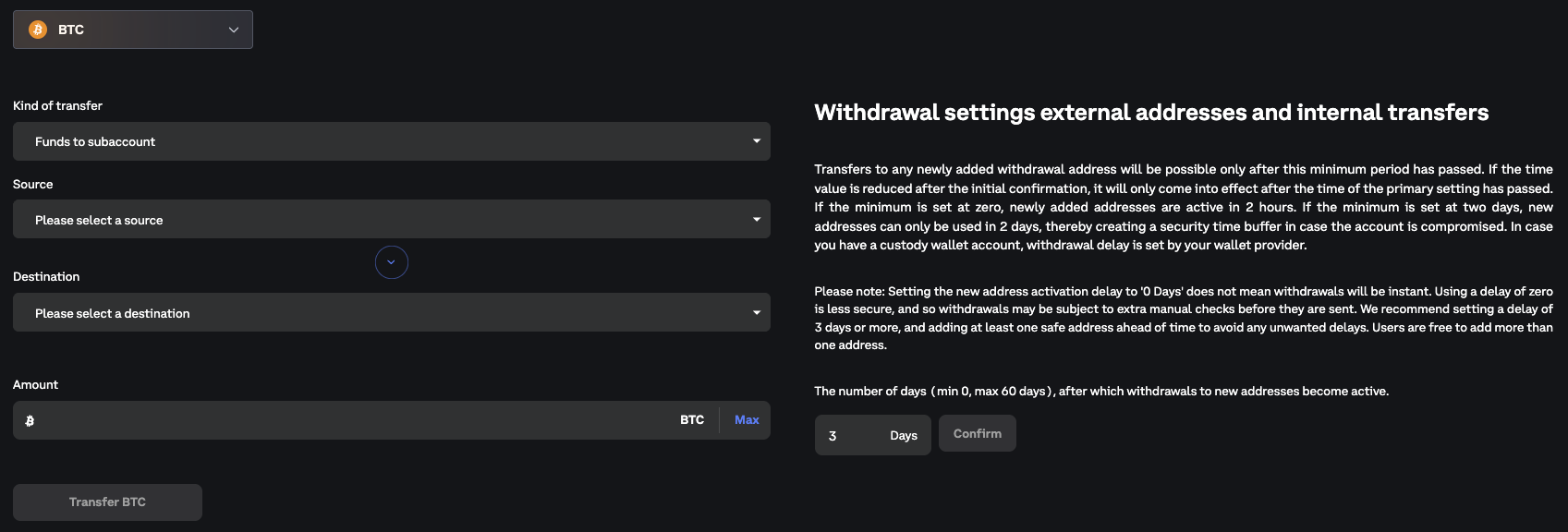
transfer.png

Balances

Once the source account has been selected, the balances are shown on the transfers page of the selected asset. The balances will not be shown to subaccounts that are directly logged in.

Balances

Available (trading) Balance

The amount of equity available on the account which is not allocated to margin requirements of open orders or positions.

This value can include cross-collateral equivalents from other currencies, and so is not necessarily available to withdraw or transfer in this currency. Spot markets can be used to move funds into the desired currency.

Current sessions Profit

The current USPL and RSPL awaiting settlement.

Withdrawable Balance

The amount available for withdrawal.

Amount

The amount to withdraw or transfer. The Max button in the amount field will automatically fill in the maximum available amount to withdraw or transfer.

Transfers initiated from the main account login

  1. Select the kind of transfer. This is either funds in the selected asset or fee balance in the selected asset.

  2. Select the source, which is the (sub)account which funds or fee balances are to be deducted from.

  3. Select the destination, which is the (sub)account which funds or fee balances are to be added to.

  4. FIll in the amount to transfer.

  5. Click the Transfer button.

Transfers are instant and are not charged any fees.

Transfers initiated from a subaccount via main account login

Transfers initiated from a subaccount that is being accessed from the main account login will have the same setup as transfers initiated from the main account.

  1. Select the kind of transfer. This is either funds in the selected asset or fee balance in the selected asset.

  2. Select the source, which is the (sub)account which funds or fee balances are to be deducted from.

  3. Select the destination, which is the (sub)account which funds or fee balances are to be added to.

  4. FIll in the amount to transfer.

  5. Click the Transfer button.

Transfers initiated from a subaccount login

Subaccounts that have setup a separate login and are logged in by this method, can only transfer funds to the main account. The source and destination are predefined and will not show on the page.

  1. Select the kind of transfer. This is either funds in the selected asset or fee balance in the selected asset.

  2. FIll in the amount to transfer.

  3. Click the Transfer button.

Performing Transfers via API 

You can also perform transfers using the API. Please note:

  • Transfers must be initiated using the main account authorisation.

  • Transfers only work between the main account and its subaccounts.

  • Transfers cannot be performed between different accounts.

Steps 

1. Create an API key on the main account 

  • Ensure the key has read_write capabilities for the scope wallet:read_write.

Tip

Please refer to Creating new API key on Deribit for guidance on API key creation

2. Authenticate with the API key 

Call public/auth to authenticate:

Tip

Please refer to API Authentication Guide for details on how to authenticate with the API

// Request
{
  "method": "public/auth",
  "params": {
    "grant_type": "client_credentials",
    "client_id": "",
    "client_secret": ""
  },
  "jsonrpc": "2.0",
  "id": 1
}

// Response
{
  "jsonrpc": "2.0",
  "id": 1,
  "result": {
    "access_token": "wdLhTK...",
    "refresh_token": "eyJhbGci...",
    "expires_in": 3600,
    "scope": "wallet:read wallet:write"
  }
}

This will return your refresh_token.

Optional step: Authenticate into a subaccount (if you want to perform subaccount to subaccount transfer) 

Use public/exchange_token with previously received refresh_token to switch into the desired subaccount:

// Request
{
  "method": "public/exchange_token",
  "params": {
    "refresh_token": "eyJhbGci...",
    "subject_id": 123
  },
  "jsonrpc": "2.0",
  "id": 2
}

// Response
{
  "jsonrpc": "2.0",
  "id": 2,
  "result": {
    "access_token": "JLkguiT...",
    "refresh_token": "ApkRzcc...",
    "expires_in": 3600,
    "scope": "wallet:read wallet:write"
  }
}

3. Perform the transfer 

To transfer funds from the main account to a subaccount, call private/submit_transfer_to_subaccount:

// Request
{
  "jsonrpc": "2.0",
  "id": 210,
  "method": "private/submit_transfer_to_subaccount",
  "params": {
    "currency": "ETH",
    "amount": 12.1234,
    "destination": 20
  }
}

// Response
{
  "jsonrpc": "2.0",
  "id": 210,
  "result": {
    "updated_timestamp": 1550226218504,
    "type": "subaccount",
    "state": "confirmed",
    "other_side": "MySubAccount",
    "id": 1,
    "direction": "payment",
    "currency": "ETH",
    "created_timestamp": 1550226218504,
    "amount": 12.1234
  }
}

To transfer funds between two subaccounts under the same main account, call private/submit_transfer_between_subaccounts. This method requires prior main account authorization.

// Request
{
  "jsonrpc": "2.0",
  "id": 210,
  "method": "private/submit_transfer_between_subaccounts",
  "params": {
    "currency": "ETH",
    "amount": 12.1234,
    "destination": 20,
    "source": 10
  }
}
// Response
{
  "jsonrpc": "2.0",
  "id": 210,
  "result": {
    "updated_timestamp": 1550226218504,
    "type": "subaccount",
    "state": "confirmed",
    "other_side": "MySubAccount",
    "id": 1,
    "direction": "payment",
    "currency": "ETH",
    "created_timestamp": 1550226218504,
    "amount": 12.1234
  }
}

Execution details 

  • The transfer is executed on behalf of the main account.

  • This ensures funds move between the main account and subaccounts securely.

Troubleshooting 
  • Using a subaccount API key: Transfers will not work if you authenticate directly with a subaccount’s API key. Always start with the main account key.

  • Between two different accounts: Transfers are only possible between the main account and its subaccounts. Attempting a transfer between unrelated accounts will fail.

  • Insufficient permissions: Make sure your API key has the correct scope: wallet:read_write.