There are several ways to arrange and execute block trades on Deribit:
-
Deribit Block RFQs (this is the latest and most advanced interface)
-
Third-party solutions
Block trading is a specialized method for executing large transactions of option contracts or cryptocurrencies without affecting the market price. Ideal for institutional investors and high-net-worth individuals, it involves trading large volumes outside the regular market. This approach ensures smoother, more stable transactions by minimizing market impact and providing "book sweep" protection.
Block trade information
-
Block trades can be distinguished from other trades in the API via the block_trade_id field. This can be seen in endpoints such as get_last_trades_by_currency for instance. Similarly, trades executed via Deribit Block RFQs will have a value in the block_rfq_id field.
-
In the user interface, block trades can be distinguished via a three blocks icon as pictured.
-
While block trades are initially agreed privately between the two parties, all block trades that are executed via any method are shown publicly in Deribit trade histories, both in the UI and via the API. The details shown include the time, size, price, and the fact that it was a block trade.
Block trade minimum size
Deribit has implemented a minimum trade size for Block Trades to safeguard order book liquidity. Block Trades are privately negotiated trades in futures, options, or a combination of multiple thereof. The following minimum sizes are required for reporting of Block Trades:
Perpetuals and futures
|
Instruments |
Perpetual and futures block trade minimum size |
Minimum tick size |
|---|---|---|
|
BTC (both BTC settled and USDC settled) |
200,000 (USD for inverse, USDC for USDC settled) |
$0.01 |
|
ETH (both BTC settled and USDC settled) |
100,000 (USD for inverse, USDC for USDC settled) |
$0.01 |
|
All other USDC settled perps and futures |
50,000 USDC |
Varies pending instrument, check here for details. |
Options
|
Instruments |
Minimum block size (contracts) |
Contract multiplier |
Minimum block size (notional) |
Minimum tick size |
|---|---|---|---|---|
|
BTC (BTC settled) |
25 |
1 |
25 BTC |
0.0001 BTC |
|
BTC (USDC settled) |
25 |
1 |
25 BTC |
5 USDC |
|
ETH (ETH settled) |
250 |
1 |
250 ETH |
0.0001 ETH |
|
ETH (USDC settled) |
250 |
1 |
250 ETH |
0.2 USDC |
|
AVAX |
25 |
100 |
2,500 AVAX |
0.0005 USDC |
|
HYPE |
150 |
10 |
1,500 HYPE |
0.002 USDC |
|
SOL |
150 |
10 |
1,500 SOL |
0.1 USDC |
|
TRX |
25 |
10,000 |
250,000 TRX |
0.00005 USDC |
|
XRP |
75 |
1,000 |
75,000 XRP |
0.0005 USDC |
Deribit Block RFQs
Deribit Block RFQs is the latest interface for sending block trade RFQs to multiple market makers at once. It is all done from within the Deribit platform. For most UI traders, this will be the superior method to execute block trades, and it is also available via the API.
This interface can be found on the Deribit platform here.
More information on this feature can be found in the Deribit Block RFQ section.
Block Trade Partners
Deribit works with several partners that provide traders with an interface for organising and trading block trades.
A block trade is a trade agreed privately between two parties. The trade is executed in the account of each party at the agreed size and price, without touching the public order books.
|
Partner |
|
Telegram contact |
|---|---|---|
|
@jeffmighty785 |
||
|
@hansen_rj |
||
|
APAC: @paradex_dane EMEA: @paradigm_nic AMER: @paradigm_acf |
||
|
@spluschris |
Each of these partners offer users an interface to arrange and execute block trades, however the trades are matched on Deribit. Some partners also offer block trades that match on other exchanges.
For any questions regarding these partners, we encourage you to reach out to them directly for support on their platforms.
Telegram Quote Request Group
Deribit has own Telegram Quote Request Group. The goal of the Telegram group is to facilitate simple quote/price requests should the screen size not be sufficient. There is a 25 BTC or 250 ETH minimum size. Before the more modern user interfaces existed for block trades, this was the main chat room for organising block trades. However, despite still being open for the time being, most traders would now arrange and execute block trades via user interface, for example the Deribit Block RFQ interface.
Creating a Block Trade using user interface
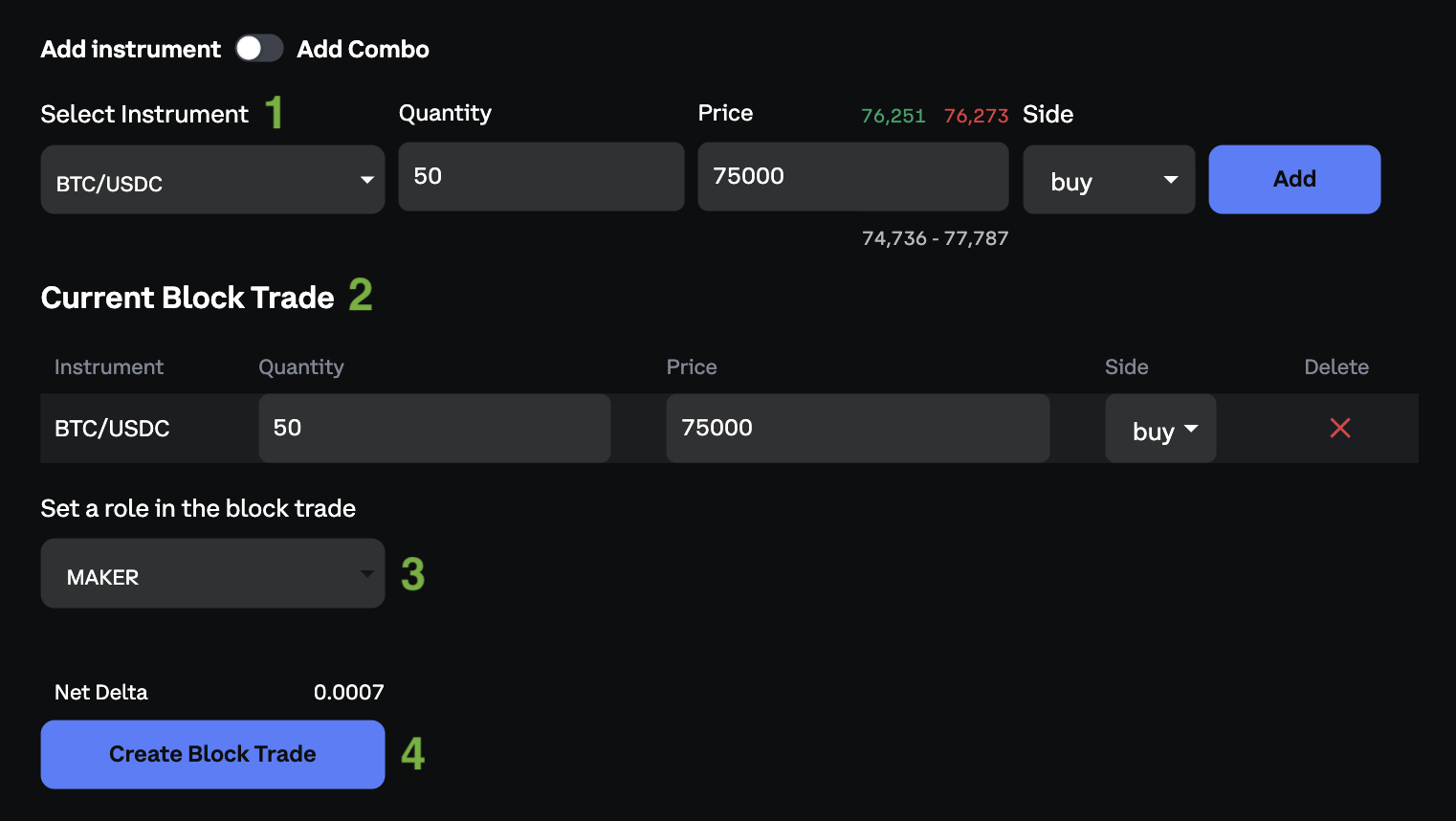
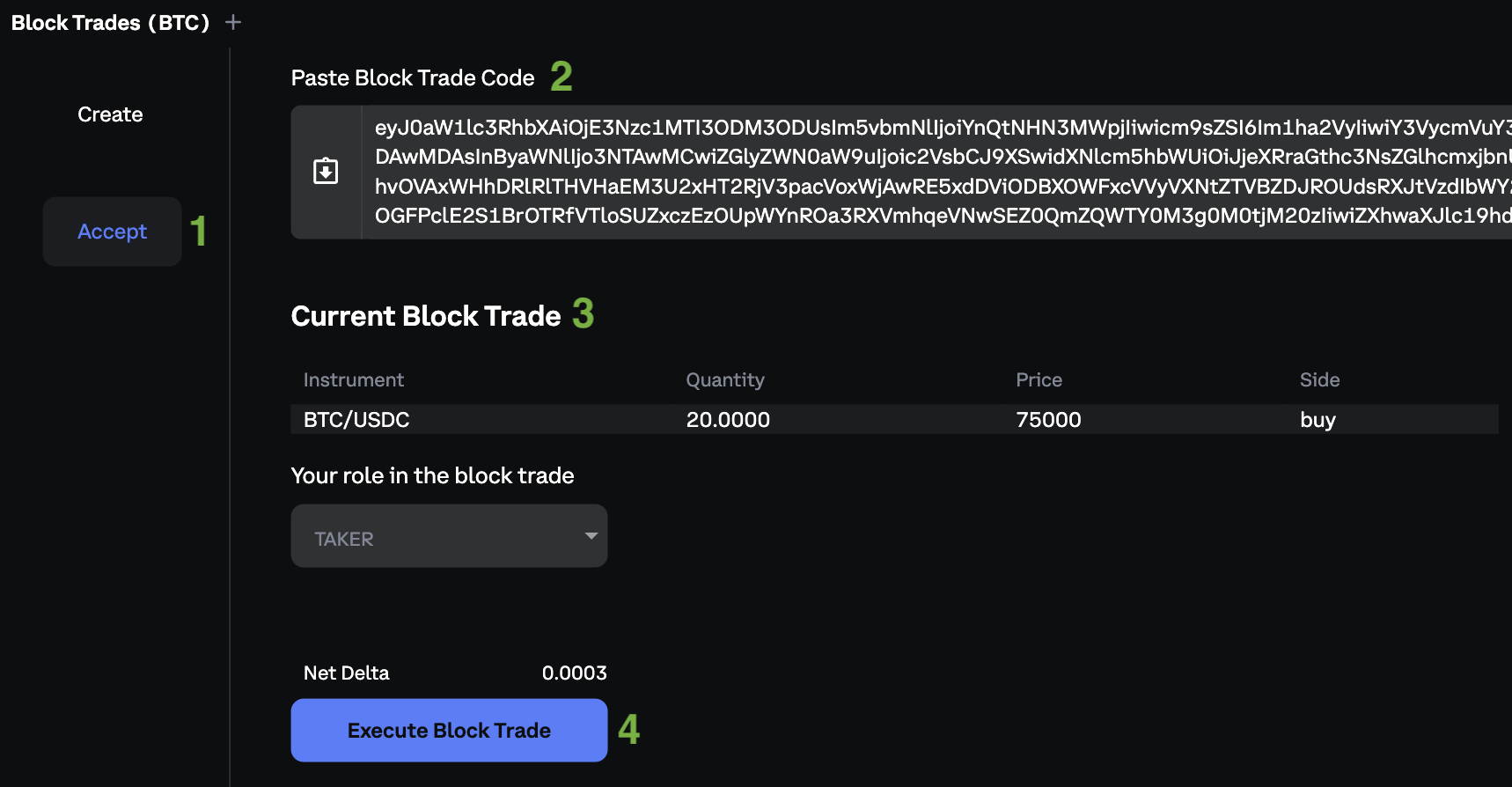
To execute a Block Trade head to the Block Trades section. Each block trade involves two parties. The first party creates the Block Trade and provides the trade code to the second party. The second party then enters the code and confirms acceptance of the Block trade.
Block Trade Creation
-
Select an instrument and provide all required parameters (Quantity, Price, Side)
-
Such instrument will be added to Current Block Trade
-
Select your role for the Block Trade (Maker/Taker)
-
Create Block Trade
-
Copy Block Trade Code and share it to the second party. The Block Trade code is active for 40 seconds and will be invalidated afterwards.
Accepting the Block Trade
-
Select "Accept" from the left panel
-
Paste the Block Trade Code received from the first party
-
Verify the details of the Block Trade
-
Execute the Block Trade
Creating a Block Trade using API
To execute a Block Trade using API, it involves two parties. For the full walkthrough, see the Block Trading API article.
-
The initial party initiates the Block Trade by calling /private/verify_block_trade to generate a block trade signature based on provided parameters. As a response, system returns a signature which must be shared with the second party.
-
After receiving the signature, the second party is required to call /private/execute_block_trade with the same parameters as first party in /private/verify_block_trade (only role field should be set appropriately) and provide the received signature in counterparty_signature.
Note
In the API, the direction field is always expressed from the maker’s perspective.
This means that when you accept a block trade as a taker, the direction shown in the API represents the opposite side of your trade.
Example:
If you are buying puts as a taker, the API will show the operation as a sell put (maker’s perspective), and you will be verifying and accepting a “sell put” block trade.
After the call, the block trade is executed.
Restricted Block Trades feature
Restricted block trades feature limits the block_trade:read scope of the API key to block trades that have been made using this specific API key. This method can be employed to restrict the visibility of user private block trades with third parties to whom the user has provided their API key.
Block Trade approval feature
Block trade approval introduces an additional layer to the block trade verification process. When activated, it necessitates an additional approval from the user from a different API key before a block trade can be executed with the specified API key. This functionality provides users with enhanced oversight, particularly when a registered partner possessing an API key intends to carry out a block trade on their behalf.
Approving the block trade using user interface
-
To use the block trade approval feature, an additional API key setting feature called enabled_features: block_trade_approvals is required. This key has to be given to the partner who performs the trades on behalf of the user. If the user wants to approve the trade, he has to approve it from different API key with doesn’t have this feature enabled.
-
When a trade is executed by a Registered Partner on behalf of any of the two clients (Client A and Client B) multiple things happen to clients with block trade approval enabled:
-
Timer of 5 minutes starts. If those 5 minutes pass, without required approvals the block trade will be rejected
-
An email with a link pointing to a block trade approval window is sent
-
An announcement about pending approval is displayed on top of their screen
-
An event is transmitted on a block_trade_confirmations channel informing about a new pending trade
-
A pop-up window emerges in the user interface. This window displays the structure of the trade that the partner intends to execute, providing options to ‘Approve' or 'Reject'. If any of the clients rejects the block trade, the window won’t show up again.
-
-
When a client is logged in through a subaccount, they will only see the popup associated with that particular subaccount. If the client is logged via the main account (which allows visibility of all main and subsidiary accounts on the Subaccount page), then they will be presented with popups for any of the accounts under that main account.
-
If client A is trading vs client B who is using the normal block trade UI, then trade would go through once client A accepts the trade in popup (if client B created block) or once client A accepts the trade in popup and client B accepts signature in Block API/Block UI (if the block was created by the broker)
Approving the block trade using API
-
To use a block trade approval feature additional API key setting feature called: enabled_features: block_trade_approvals is required. This key has to be given to broker/registred partner who performs the trades on behalf of the user for the feature to be active. If the user wants to approve the trade, he has to approve it from different API key with doesn’t have this feature enabled.
-
Client A calls /private/verify_block_trade by providing trade details, timestamp, nonce and role. As a response, system returns a signature which must be shared with the Client B. Since then a countdown of 5 minutes starts to execute and approve the block trade.
-
Client B calls /private/execute_block_trade with the same trade details, timestamp, nonce and signature received from Client A. The role has to be different(maker/taker). If any of the clients has approvals enabled the block trade receives pending status instead of the usual execution.
-
Clients can use private/get_block_trade_requests endpoint and block_trade_confirmations channel to monitor their pending confirmations.
-
To approve a block trade private/approve_block_trade can be used. private/reject_block_trade is used to reject. Timestamp, nonce and role are required to select a block trade. This endpoint must be called using an API key that does not have the block trade approval feature enabled.
When all users who are required to give approvals have approved the block trade, Deribit proceeds to execute it automatically.