A market limit order is initially submitted as a market order to execute at the current best available market price. If the order is only partially filled, the remainder of the order enters the order book as a limit order, with the limit price equal to the price at which the filled portion of the order was executed. This order type is available for futures, perpetuals, and options.
Additional details
Can be used to limit slippage to the first matched price. Slippage typically occurs during periods of high volatility and/or low liquidity. As an example, if you place a market order to buy an asset that is currently trading at $100, but due to market conditions, the order is actually filled at $102, this $2 difference is considered slippage. Market limit orders limit the slippage to the first price that the order gets a fill at. This does mean the remaining portion that is left as a limit order at that price is not guaranteed to be filled though. It's also worth noting that there can still be significant slippage if the first available price is not close to the current value of the instrument.
Options: protection against a bad price
On options, the web UI and the app can disable the Buy or Sell button if a market limit order would execute too far from the mark price. The interface shows a message such as "Sell is disabled since this order type would result in an execution at a bad price." (or the equivalent for Buy). This is a protection against submitting a poorly priced order. It does not mean that market limit is unavailable for options.
The check compares the expected execution price with the option's mark price. Currently, the order is treated as a bad price when the adverse deviation from mark is larger than the greater of:
-
2% of the mark price (200 bps)
-
3 times the instrument's maximum tick size
These thresholds can be changed by Deribit at any time.
Example of order
For example, let’s assume Bitcoin is currently trading with a best bid of $100,000 [1] and a best ask of $100,001 [2,3]. If a market limit order to buy is placed, the order will now fill against the best ask of $100,001 [2,3]. It can not execute at a worse (higher) price. Unlike a market order (where if the best ask is exhausted while filling the order, any remaining portion would move on to the next best ask), a market limit order will set a limit order for any remaining portion at the price of the first filled price [2,4] ($100,001 in this example).
![For example, let’s assume Bitcoin is currently trading with a best bid of $100,000 [1] and a best ask of $100,001 [2,3].](https://images.ctfassets.net/voaboiz0ig30/da-deribit-img-173/063a38e6163b466bc65aab45139b94c8/market-limit-order-1.jpg)
Placing a market-limit order on Deribit
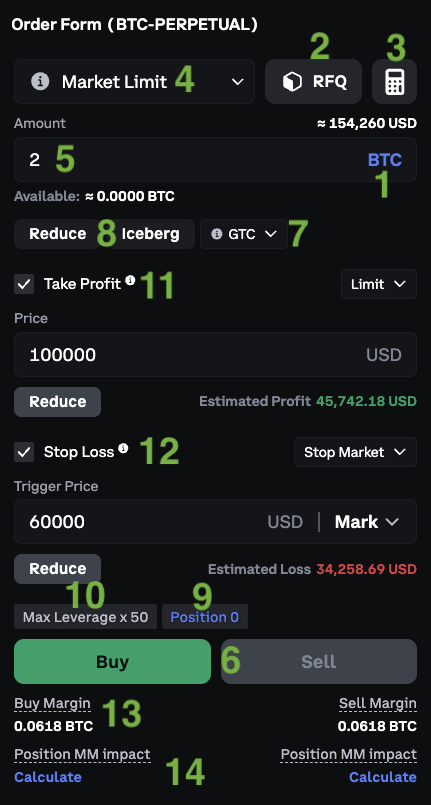
-
USD or asset selection. Choose whether you want to enter the size of the order in USD or an amount of the underlying asset. Values will be rounded to the nearest valid amount.
-
RFQ. This button allows traders to send a notification to market makers that indicates they are interested in trading the instrument. This will allow market makers to put a quote into the order book for the requested size. This button is informational only, not an execution mechanism.
-
A profit and loss calculator.
-
Order type. Some order types are not available for certain instruments.
-
Order amount
-
Buy and Sell buttons
-
TIF
-
Good till cancel (GTC) - GTC is the default setting. The order will remain open until it is filled, cancelled, or the instrument expires.
-
Good till day (GTD) - If it has not already been filled or cancelled, the order will be cancelled automatically at the end of the current daily session (8 AM UTC).
-
Immediate or cancel (IOC) - Any portion of the order that cannot be filled immediately will be cancelled.
-
Fill or Kill (FOK) - The order is either filled immediately and completely, or not at all.
-
-
Special ordertype
-
Reduce (reduce_only) - This setting will ensure the order can only reduce an open position. It can not increase the size of any existing positions, or open any new positions.
-
An Iceberg order allows a trader to hide the full size of an order while revealing only a portion (the display amount) in the order book. The visible portion behaves like a regular limit order, while the hidden portion remains concealed until the visible part is filled.
Aggressive iceberg orders match as regular taker orders. When placed into the order book iceberg orders match as maker orders on the displayed part and taker orders on the hidden part. The hidden amount of an iceberg order also loses priority to regular orders.
-
Post only (post_only) - This setting will ensure the order will not act as a taker, and therefore will not match against orders that are already resting in the orderbook (excluding hidden orders). If the price of the order is such that it would otherwise execute against the best available price, the post only order will be placed into the order book one tick away from the best available price.
-
-
The current position size on the selected instrument.
-
The maximum leverage possible on the instrument.
-
Take profit as secondary order.
-
On/Off toggle.
-
Order type. Some order types are not available for certain instruments.
-
Trigger Price - The price which once reached, will trigger the placement of the order.
-
Order price
-
Trigger
-
Mark - When “Mark” is selected for the trigger price, the mark price reaching or crossing the chosen trigger price will trigger the placement of the conditional order.
-
Last - When “Last” is selected for the trigger price, the last traded price of the instrument reaching or crossing the chosen trigger price will trigger the placement of the conditional order.
-
Index - When “Index” is selected for the trigger price, the index price reaching or crossing the chosen trigger price will trigger the placement of the conditional order.
-
-
Special
-
Reduce (reduce_only) - This setting will ensure the order can only reduce an open position. It can not increase the size of any existing positions, or open any new positions.
-
-
Estimated profit if the primary order is filled and then the secondary order is also filled.
-
-
Stop-loss as secondary order.
-
On/Off toggle.
-
Order type. Some order types are not available for certain instruments.
-
Trigger Price - The price which once reached, will trigger the placement of the order.
-
Order price
-
Trigger
-
Mark - When “Mark” is selected for the trigger price, the mark price reaching or crossing the chosen trigger price will trigger the placement of the conditional order.
-
Last - When “Last” is selected for the trigger price, the last traded price of the instrument reaching or crossing the chosen trigger price will trigger the placement of the conditional order.
-
Index - When “Index” is selected for the trigger price, the index price reaching or crossing the chosen trigger price will trigger the placement of the conditional order.
-
-
Trigger Offset - Used to set the maximum distance from the current price for a trailing stop.
-
Special
-
Reduce (reduce_only) - This setting will ensure the order can only reduce an open position. It can not increase the size of any existing positions, or open any new positions.
-
-
Estimated profit if the primary order is filled and then the secondary order is also filled.
-
-
Initial margin requirement
-
Position impact PM (portfolio margin).