The Position Builder is an advanced risk management and strategy visualisation tool. It allows traders to build, analyse, and save hypothetical portfolios consisting of multiple options and futures positions.
This tool empowers traders to visualise the combined Profit & Loss (P&L) payoff diagram of a complex strategy, helping them understand the potential risks, rewards, and Greek exposures before ever executing a trade.
Important
Position Builder can be accessed under: https://pb.deribit.com/
Test-env Position Builder is currently deprecated.
Tip
The same risk calculations are available through the Position Builder API. The reference covers estimated liquidation price (ELP) and margin chart calculations, and is published at https://pb.deribit.com/docs. The API is experimental.
Warning
Deribit can't guarantee the accuracy of the information presented here nor can we be held responsible in any way to how you choose to act upon the information and simulations presented in this tool. In any case, certain assumptions have to be made when simulating underlying moves.This tool is designed to simulate positions. It is not possible to create trades from the Position Builder.
Authentication (Log In)
While you can build hypothetical portfolios as an anonymous user, logging in with your Deribit account provides enhanced functionality.
-
How to Log In: You can authenticate using your existing Deribit account credentials via a Single Sign-On (SSO) process. Clicking the "Log In" button in the top right corner, will redirect you to the main Deribit authentication page.
-
Permissions: Upon your first login, the Position Builder will request read-only access to your account. This permission is necessary to load your live positions.
-
Key Benefit (Loading Live Positions): The primary advantage of logging in is the ability to load your account's actual, live positions directly into the Position Builder. This allows you to perform "what-if" analysis by adding hypothetical trades to your real-time portfolio.
Note
You can also login directly from the Deribit user interface
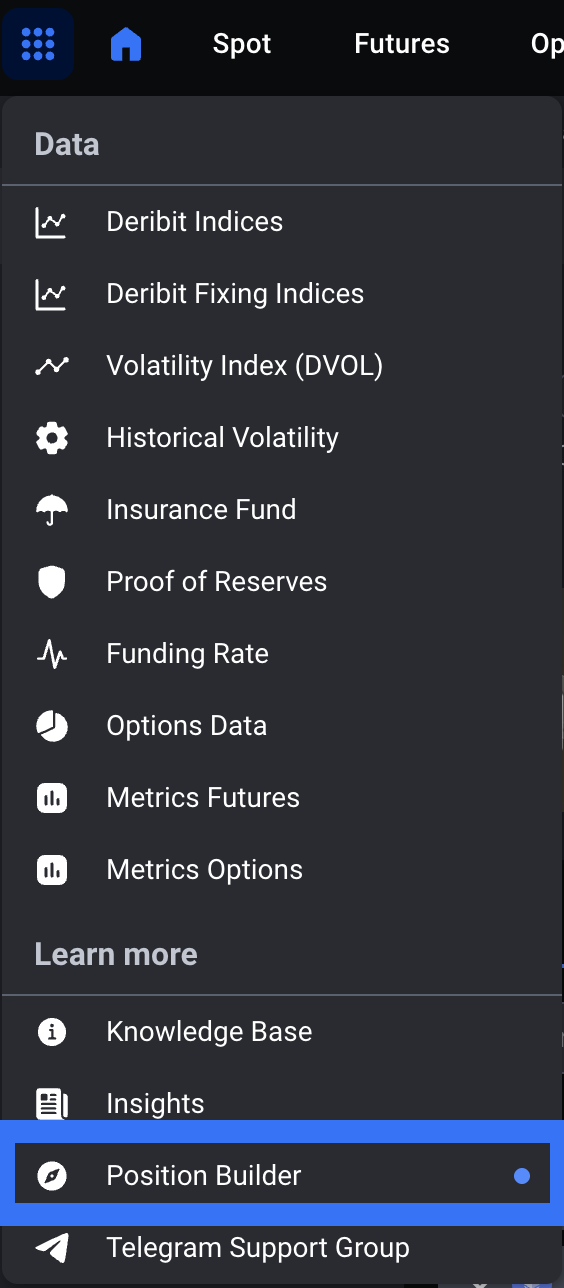
Basic Functionality
The Position Builder provides a "sandbox" to model market scenarios and strategies.
-
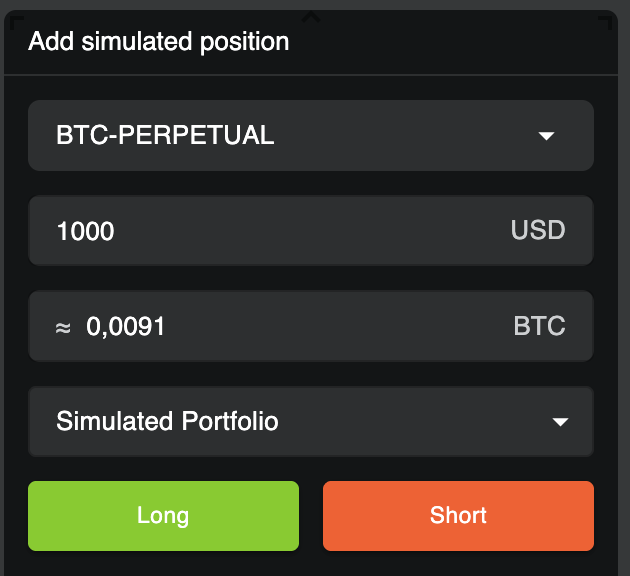
Add simulated positions: Users can select multiple instruments from options and futures across different expiries, and add them to a hypothetical portfolio (e.g., 1. LONG BTC-PERPETUAL, 2. SHORT BTC-26DEC25-50000-C).
-
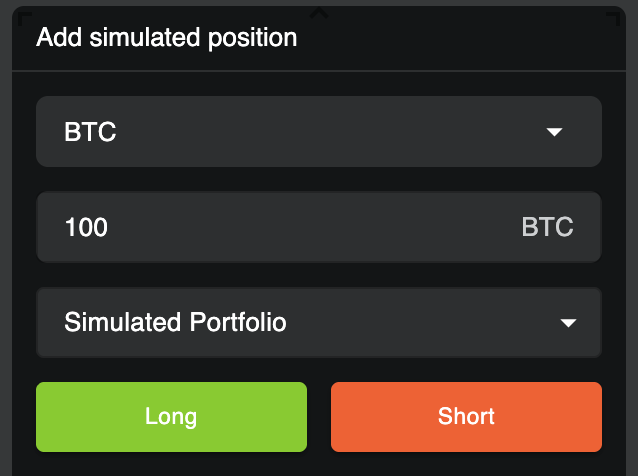
Add equity: Users can add equity to their hypothetical portfolio using the "Add simulated position" modal. To do so, select the desired currency, enter the amount, and set the direction to "Long" to add the currency holding to your portfolio.
-
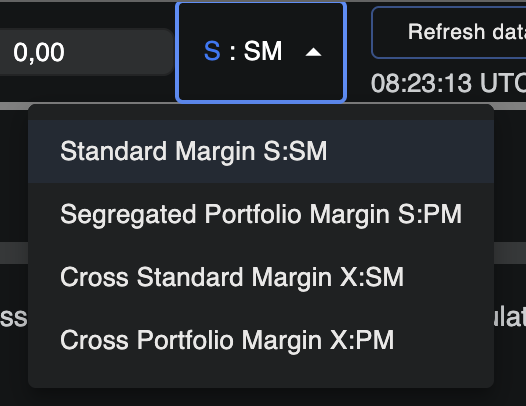
Select Margin Model: In the top-right corner, you can toggle between Cross Margin and Segregated Margin (Portfolio Margin) for your simulation. This is a critical setting:
Note
This does not change your real margin model.
-
Cross Margin: Allows you to add positions from ALL available currencies (e.g., BTC, ETH, USD) into a single, combined portfolio.
-
Segregated Margin: Restricts the simulation to only one currency at a time. To analyze a different currency, you must select it from the main currency switcher at the top of the page.
-
-
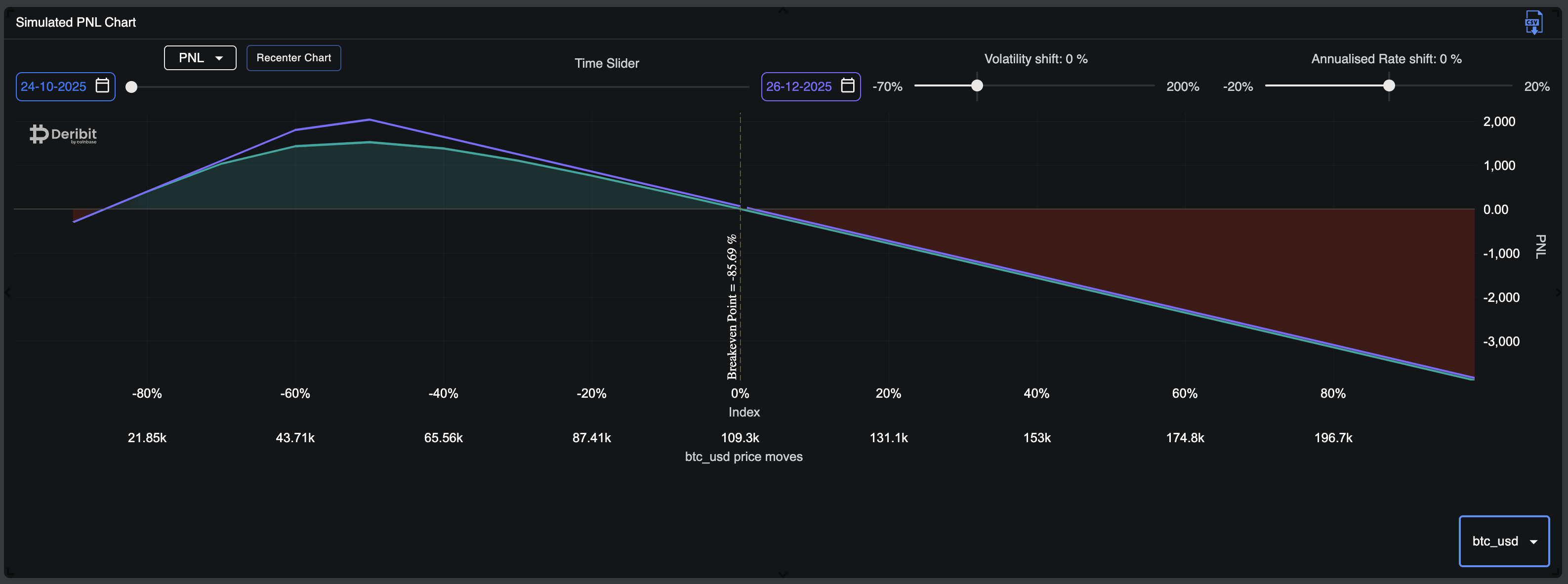
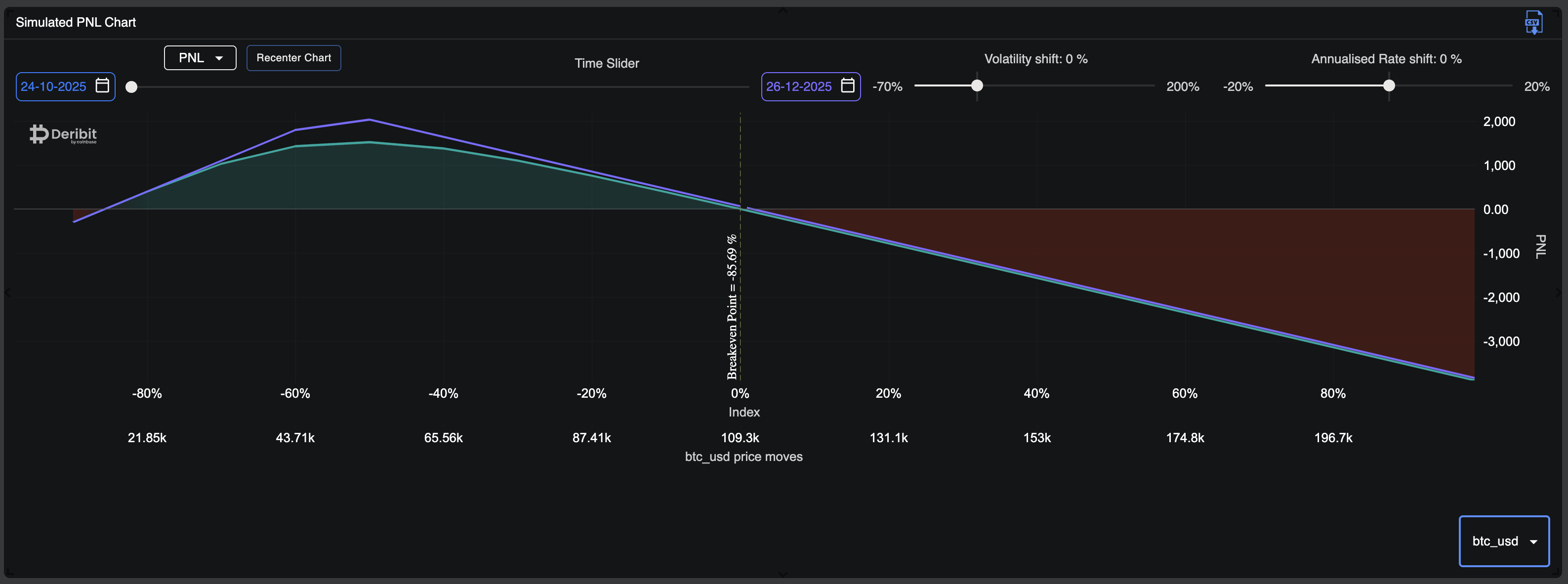
Visualise P&L: The tool generates a clear P&L chart showing the portfolio's net position against index price change.
Important
In Position Builder, expired options are intentionally still included in PNL calculations when you move the simulation date past their expiry. These positions do not disappear automatically; instead, their PNL is taken as of expiry and remains reflected in the overall PNL.
This behavior is by design. If expired positions were removed entirely, it would be impossible to correctly analyze calendar spreads, rolls, or multi-expiry strategies, where the PNL impact of earlier expiries is essential.
If you want to view risk and PNL only for active positions, expired options must be “manually unticked”, which will exclude them from the simulation.
-
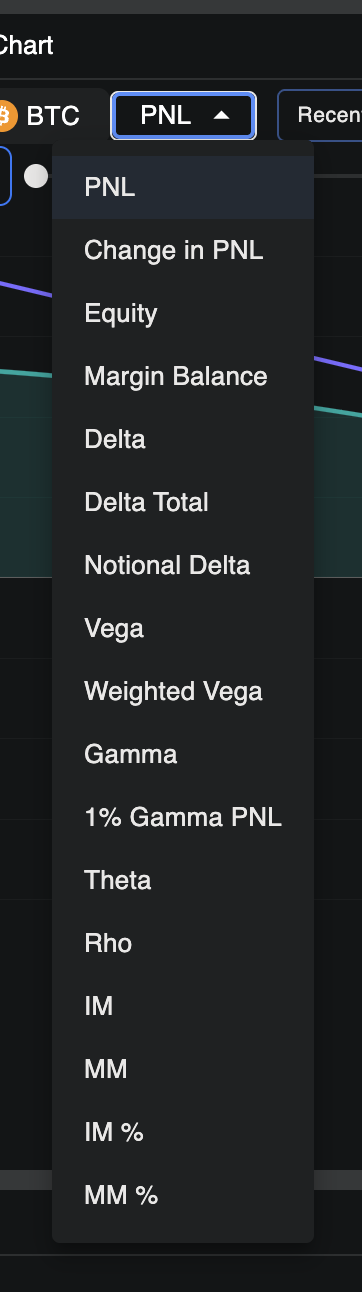
Change Chart Metric: By default, the chart displays your PNL. However, you can change this metric using the dropdown menu in the top-left corner of the chart. This allows you to visualize other key values across different underlying prices, such as Equity, Margin Balance, IM, MM, or Greeks.
-
Index Shift: Located in the top-right, this feature simulates an index shift, which will change the BTC and ETH index values. All altcoin indices will be shifted by this same amount. This change will be reflected in your Account Summary and the Simulated Portfolio table.
-
Time Shift: Located above the chart, this slider allows to simulate the impact of days passing. Option prices decrease with time and we simulate Future prices moving towards Index price. You can also change the start date and end date to slide between 2 periods of time with more granularity.
-
Volatility (IV) Shift: Located above the chart, this powerful slider is a stress scenario-testing tool. It lets you instantly see how your portfolio would react to market-wide changes in Implied Volatility (IV). Its practical purpose is to test your portfolio's Vega (its sensitivity to volatility) by applying an absolute shift to the IV of all options.
-
Example: If you set the shift to +10%, an option with a current IV of 50% will be instantly re-priced as if its IV were 60%. This will move the P&L up or down, showing you the immediate profit or loss from that IV spike. This is crucial for managing volatility-sensitive positions.
-
-
Annualised Rate Shift: Located above the chart, this slider simulates a shift in the annualised interest rate, which in turn changes the forward prices (basis) of all dated expiries. The shift is applied on an annualised basis, so its effect is scaled by the instrument's time to expiry.
-
Example: A +10% rate shift will change the forward price of a 1-year expiry by +10%. For an expiry 30 days away, the shift to its forward price will be scaled down: +10% * (30 / 365).
-
-
Analyse Portfolio: Position Builder calculates the combined portfolio summary including Greeks (Delta, Gamma, Vega, Theta), allowing traders to see their net exposure to price, volatility, and time decay. Simulated portfolio is displayed under the chart.

-
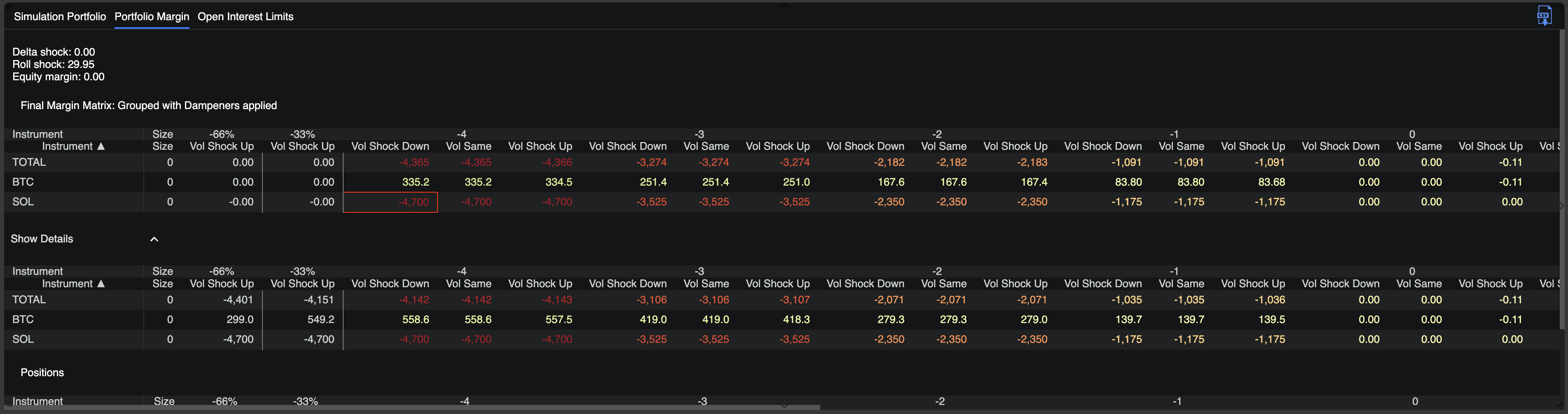
Analyse PM Risk Matrix: If your current Margin Model has Portfolio Margin enabled, you can access and analyse the Risk Margin Matrix specific to your current portfolio. For detailed information on the Risk Matrix, please refer to the Portfolio Margin article.
Tip
To undo any applied shifts or positions, simply click the "Remove all Overrides" button in the top-left corner. Alternatively, you can select and remove them individually.

Tip
To assist traders in fully utilising the Position Builder, Deribit Insights provides comprehensive guides covering its foundational and advanced applications.
Learn how to accurately model complex, multi-leg option strategies (such as spreads, straddles, and butterflies) and understand the tool's interface for detailed risk analysis before execution.
Advanced Functionality & FAQs
Q: Does the system factor in the futures premium/discount (basis) for dated futures (e.g., BTC-250926) when showing valuations?
A: Yes. For dated futures and their corresponding options underlyings, the system utilizes a "Rate Shift". This mechanism is used to accurately model the forward curve and account for the basis (the difference between the spot price and the dated futures price), ensuring that valuations and simulations reflect this carry cost or premium.
Q: Why use a "Rate Shift" instead of a funding rate? Why not use the funding rate as a proxy for the carry cost between perp and spot?
A: This highlights a key difference in how dated contracts and perpetuals (perps) are handled by the system.
-
Dated Futures & Options: As mentioned above, the "Rate Shift" is applied to dated contracts to model the forward curve.
-
Perpetuals (Perps): The "Rate Shift" is not used for perpetuals. Instead, to simulate the carry cost (which the funding rate represents), the system uses the premium or discount between the mark price and the index price. The interest rate component for the perp underlying is calculated as:
(mark_price - index_price) / index_price
Q: How does applying a “rate shift” affect the P&L calculation for a dated futures contract, and what are the relevant formulas?
A: When a rate shift is applied to a dated futures contract, it adjusts the forward (or “exit”) price based on the modified interest/carry rate over the remaining time to expiry. This allows you to simulate how interest rate changes affect the valuation of dated futures.
Formulas used:
-
Adjusted rate
r = domesticRate + domesticRateShift
-
Simulated exit price
exitPrice = simulatedIndex * exp(r * T)
where T is time to expiry in years.
-
Entry price
entryPrice = markPrice(if using mark-price entry)
entryPrice = averagePrice (if using average-price entry)
-
P&L calculation
pnl = position.amount / entryPrice - position.amount / exitPrice
Notes:
-
domesticRate – base interest or carry rate (annualized).
-
domesticRateShift – simulated rate change applied for scenario testing.
-
simulatedIndex – underlying index level in the simulation.
-
T – time to expiry in years.
-
position.amount – number of contracts or position size.
Important
This is a simulation feature. Results are hypothetical and depend on model assumptions. They are not indicative of actual market outcomes. Users should exercise caution, and Deribit assumes no liability for trading decisions based on these simulated results.