The Position Move action allows users to transfer an open position from one subaccount (or the main account) to another within the same main account. This operation is treated as a synthetic trade: it adjusts positions internally without affecting the market order book.
Important
-
Main account authorization is required to perform a position move.
-
Position moves cannot occur between different main accounts.
-
The source and destination (sub)accounts must belong to the same main account structure.
User Interface Usage
Users can move positions from the Move Positions section in the top-right corner of the interface.
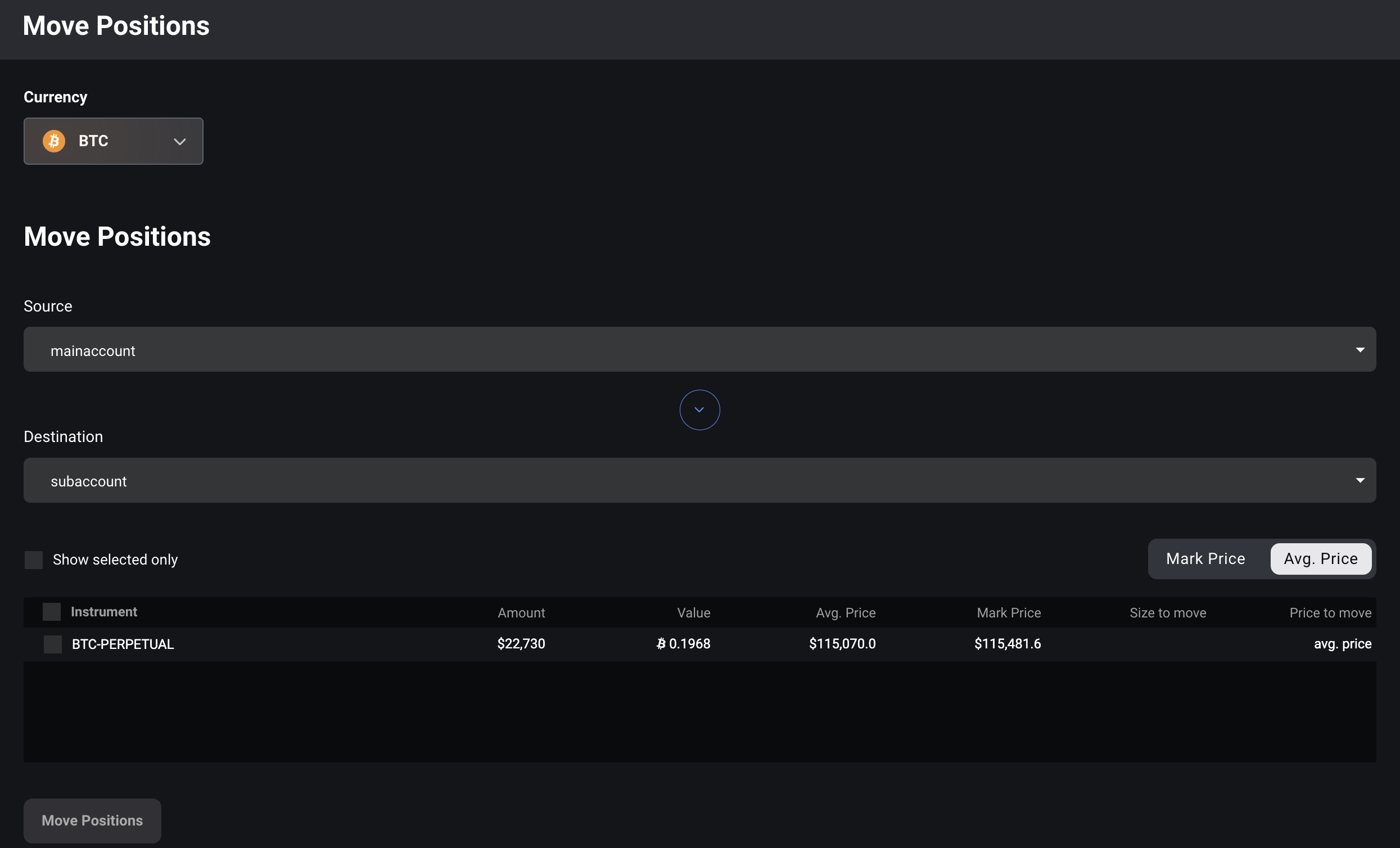
Steps:
-
Select Base Currency – Choose the base currency (e.g., BTC, ETH) for which the position applies.
-
Select Source Account – Choose the mainaccount or subaccount currently holding the position.
-
Select Destination Account – Choose the main account or subaccount that will receive the position. The destination must belong to the same main account.
-
Select Position – Pick the specific open position you wish to move.
-
Optional: Configure Move Details
-
Size to move: Specify the portion of the position to move.
-
Default: Full Size (entire position).
-
Custom: Enter a smaller amount for partial transfer.
-
-
Price to move: Choose the pricing method for the synthetic trade:
-
Average Price (default): Uses the position’s average entry price.
-
Mark Price: Uses the current mark price at the time of transfer.
-
Custom Price: Enter a manual price.
-
-
-
Confirm the Move – Review the details and confirm. The system will create a synthetic trade between the source and destination accounts, updating both position records instantly. Such trade should be visible in your Transaction Log as "position move" type of event.

API Usage
You can move full or partial existing positions from a source (sub)account to a target (sub)account (under the same main account) using private/move_positions API method. Please refer to our API Documentation article for more details.