Note
This guide builds on the First Steps article and is intended for users who have already created and secured their account, verified their identity (KYC), and funded their wallet.
For comprehensive guidance, please refer to the Account Setup Guide article.
Tip
For information on Voice Broker trading via the api, see the relevant api documentation.
Broker Account Setup and Official Recognition
Before you can onboard clients, your account must be officially recognised as a broker. To proceed with this process, the client is required to submit a request via their designated sales representative.
For corporate accounts intending to operate as a Broker/Prime Broker (executing orders on behalf of clients), the account setup process requires specific information and attestations via the corporate Know Your Customer (KYC) form, including:
-
Type of Business and Account Purpose: The corporate client should select Broker/Prime Broker as the type of business and Executing of orders on behalf of clients as the purpose of the account.
-
Regulatory Check: The onboarding process will verify if the company possesses an appropriate license from a competent financial services regulator for the services it offers. If not, the company will be asked if it is exempt from having a license, in which case documentary proof of the exemption is required.
-
Contractual Arrangement: Confirmation is required that a contractual arrangement is in place with the client(s) for these services.
-
Broker Attestation: The company must complete a signed declaration (Statement for Brokers) to attest that:
-
The company is authorised to act on behalf of its client(s).
-
Its AML/KYC procedures comply with Financial Action Task Force (FATF) standards.
-
The company has onboarded clients and markets its services to prospect clients in accordance with the requirements of the client’s jurisdiction.
-
None of the company’s clients are from any of the Restricted Jurisdictions.
-
After successful verification and provided that the above conditions are met, our team can enable the voice broker functionality for your account.
Partner Rebate Configuration
The platform facilitates partner rebates for brokers who have this feature enabled. This setup is managed internally by Deribit but is essential for your revenue stream. In order to configure a partner rebate set up on your account, please contact your sales representative. For detailed information on Partner rebates refer to the Partner Fee Scenarios article.
Client Onboarding Process
After your broker account is set up, you can onboard clients who will then be able to accept your trades.
-
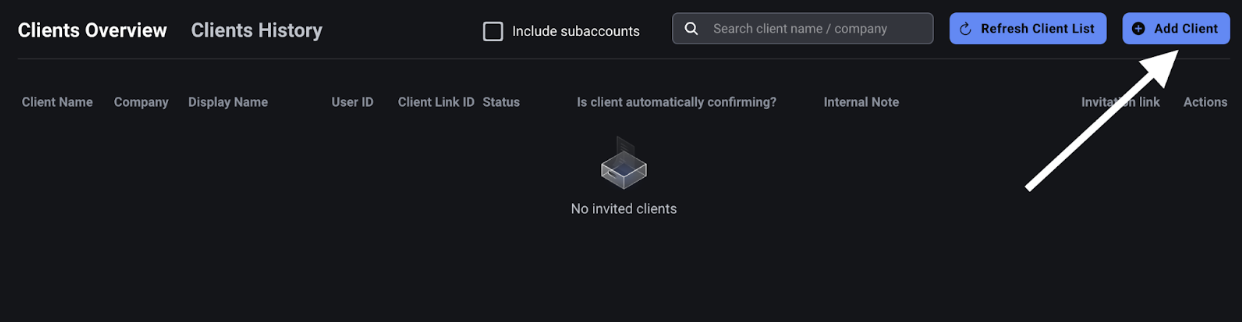
Access Client Overview: Navigate to the Broker Clients Overview page (initially empty).
-
Add New Client: Click the button to Add a Client.
-
Generate & Share Link:
-
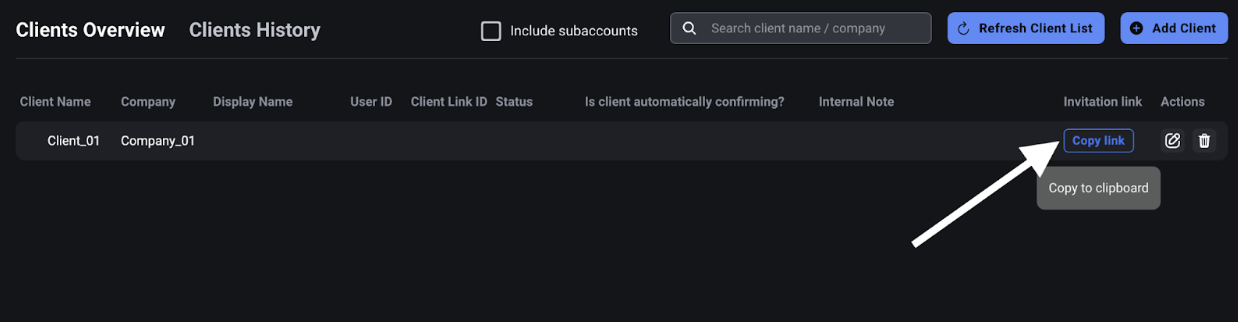
The system generates a unique invitation link for the new client.
-
Copy the link and send it to the client via email or instant messaging software.
-
-
Client Connection Handshake:
-
The client must be logged into their Deribit account and open the link.
-
An invitation will pop up asking the client if they want to connect to your broker profile.
-
-
Client's Confirmation Choice: When accepting the invitation, the client must choose one of the following trade confirmation flows:
-
Manually Confirm: The client must approve every trade you initiate in their own user interface (UI).
-
Auto Accept: All trades you send will be automatically accepted on their account immediately, provided they have sufficient margin.
Note
Only clients who select Auto Accept can be allocated trades via a block RFQ request, as manual confirmation clients are grayed out for this allocation type.
-
-
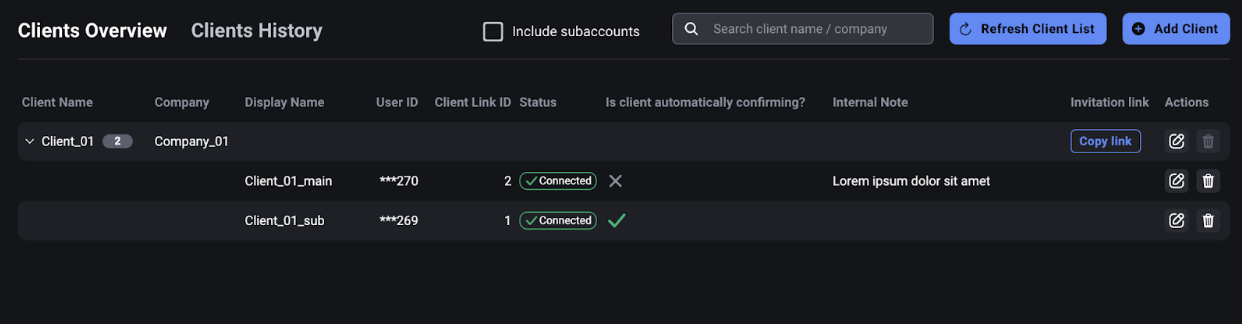
Sub-Accounts: The same link can be accepted multiple times on sub accounts of the same main account.
-
Manage Client Connections: As the broker, you can:
-
See which sub-accounts have been connected.
-
See their confirmation status (Manual or Auto Accept).
-
Rename the connection (e.g., to BTC account) to help you correctly direct trades to the client's preferred account.
-
Delete the connection if needed
Note
Broker API methods related to client setup and management require the block_trade scope. Please ensure your API keys have this scope enabled to use the full range of broker client setup functionalities.
-
Sharing Corporate Identifiers with Your Broker (LEI & BRN)
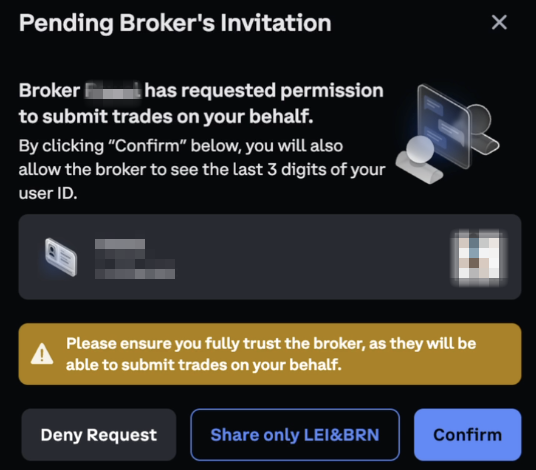
Due to regulatory requirements, some voice brokers are required to know their clients' registration details. Clients can choose to share their Legal Entity Identifier (LEI) and Business Registration Number (BRN) with their broker.
Sharing from a Connected Account
If the main account is already connected to a broker, an option to share corporate registration numbers is available directly from the broker connection settings.
-
On the main account connected to a broker, a Share corporate registration numbers toggle is displayed in the broker overview table.
-
This toggle controls the visibility of both LEI and BRN to the broker.
-
Account level scope is required to change this setting.
Sharing via Invitation Link (Without Full Connection)
A client can share their corporate identity information even if the main account does not intend to fully connect to a broker.
-
The main account can open the broker's invitation link and select Share only LEI & BRN instead of completing a full broker connection.
-
This allows clients to fulfil regulatory identity-sharing requirements without granting the broker full trade execution access.
Broker View: Clients Overview
Brokers can view the shared corporate identifiers of their clients in the Broker Clients Overview page. Dedicated LEI and BRN columns display the values shared by each client. Clients who have not shared their identifiers will show empty values in these columns.
Broker-Initiated Trade Process
Once clients are onboarded, you can initiate a trade.
-
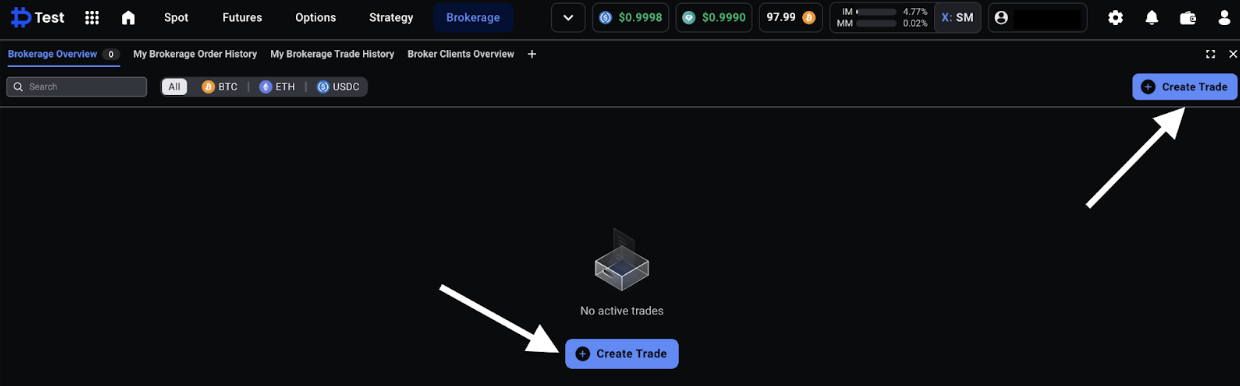
Trade Initiation: As the broker, you initiate a trade (e.g., using the Block RFQ tool) after realizing Customer A wants to trade with Customer B at an agreed price.
-
Allocation: The trade will go to the respective client accounts.
-
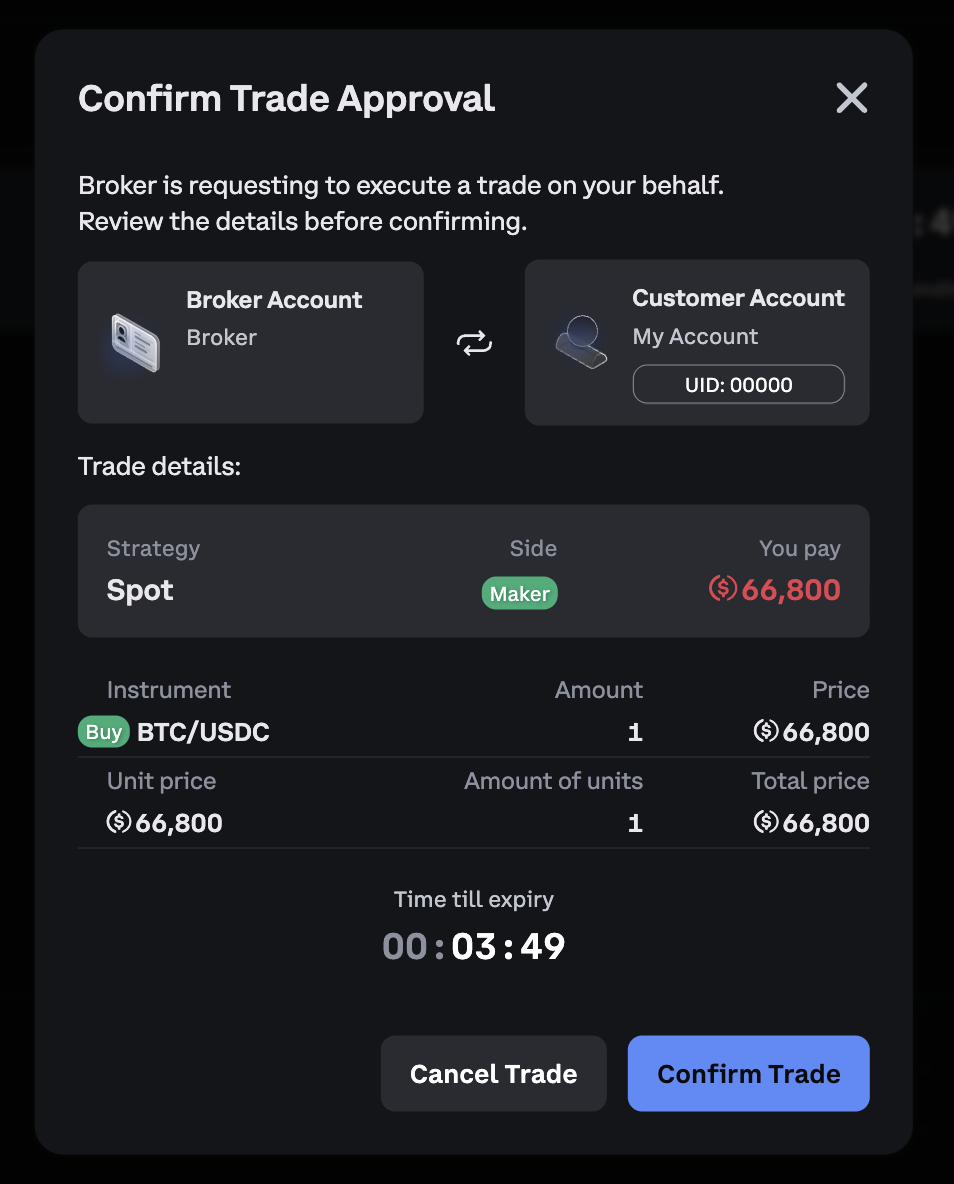
Confirmation:
-
If a client chose Auto Accept, the trade is executed immediately on their account.
-
If a client chose Manually Confirm, the trade enters a pending state, and the client must manually approve it in their UI.
-
-
Trade Allocation from Block RFQ: If a broker uses the Block RFQ tool to request a price and wants to allocate the resulting trade to clients, they can only allocate to clients who have set their confirmation to Auto Accept.
-
Trade Cancellation: A broker can cancel a trade if a mistake is noticed, even if one party has already accepted it. It is not possible to cancel a trade if both parties have confirmed it.
-
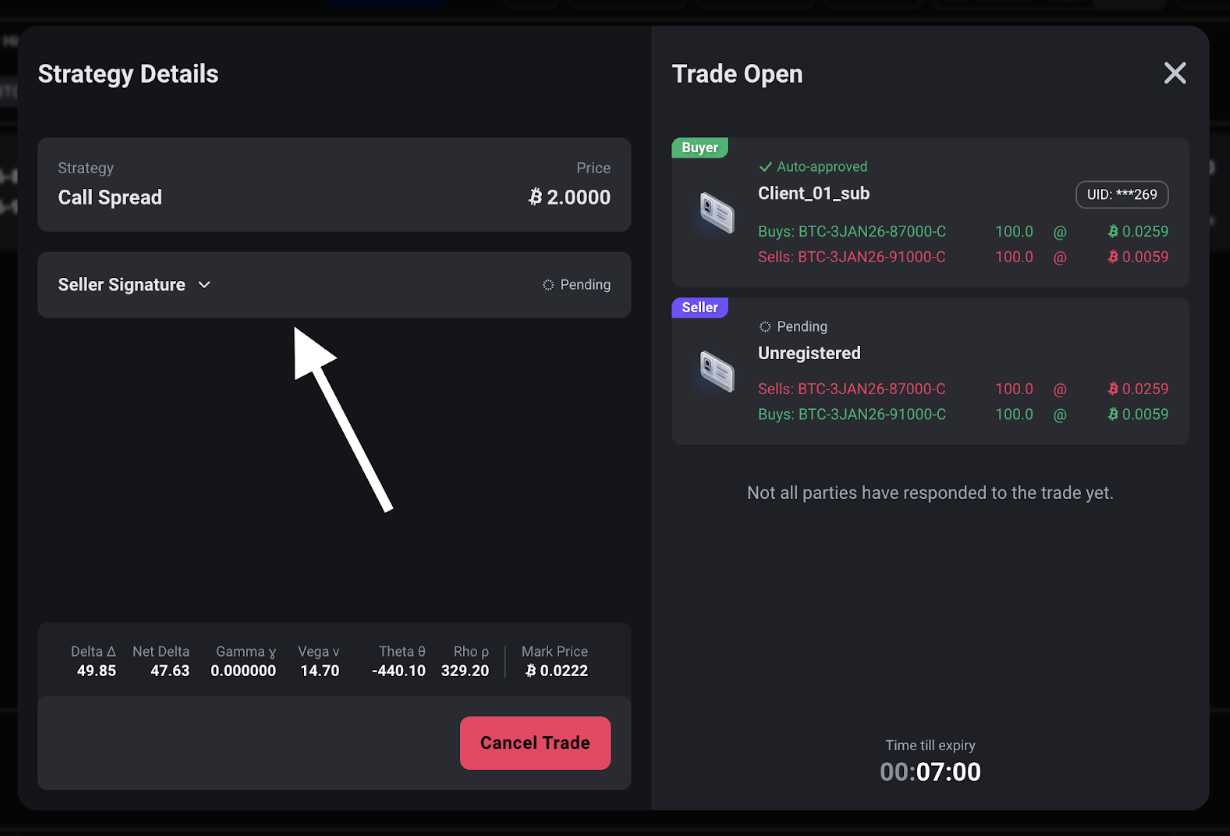
Unregistered Counterparty:You can book a block trade even if one counterparty is not formally onboarded via the connection link.
-
A broker can initiate a block trade without pre-providing any clients. The trade can be accepted (via signature/hash) by any unregistered user (client of Deribit) not present on the broker's client list.
-
In this case, you must share the trade signature with the unregistered client so they can manually accept the trade on their Deribit account via the UI or API.
-
For detailed information on Partner rebates refer to the Partner Fee Scenarios article.
-
Broker Subaccount Access
The Voice Broker functionality for trading and client management are accessible from broker’s subaccounts as well, enabling for example different sales desks (e.g., London and Dubai) to work independently.
-
Client Segmentation: Functionality is restricted to clients the subaccounts onboarded themselves. A broker’s sub account can initiate trades between clients onboarded into this sub account. Subaccounts cannot access or trade with clients belonging to other subaccounts or the main account.
-
Main Account Oversight: The main account retains the ability to manage and trade using all its subaccounts' clients and will see all trades for auditing purposes.